A PHP Error was encountered

Severity: Notice

Message: Undefined index: HTTP_ACCEPT_LANGUAGE

Filename: core/MY_Controller.php

Line Number: 178

A PHP Error was encountered

Severity: Warning

Message: array_key_exists(): The first argument should be either a string or an integer

Filename: core/MY_Controller.php

Line Number: 181

A PHP Error was encountered

Severity: Notice

Message: Undefined index: HTTP_ACCEPT_LANGUAGE

Filename: core/MY_Controller.php

Line Number: 185

A PHP Error was encountered

Severity: Warning

Message: array_key_exists(): The first argument should be either a string or an integer

Filename: core/MY_Controller.php

Line Number: 188

A PHP Error was encountered

Severity: Notice

Message: Undefined index: /support/knowledge_base/

Filename: controllers/knowledge_base.php

Line Number: 89

A PHP Error was encountered

Severity: Notice

Message: Trying to get property of non-object

Filename: controllers/knowledge_base.php

Line Number: 94

A PHP Error was encountered

Severity: Notice

Message: Trying to get property of non-object

Filename: controllers/knowledge_base.php

Line Number: 95

A PHP Error was encountered

Severity: Notice

Message: Trying to get property of non-object

Filename: controllers/knowledge_base.php

Line Number: 96

A PHP Error was encountered

Severity: Warning

Message: curl_setopt(): CURLOPT_FOLLOWLOCATION cannot be activated when safe_mode is enabled or an open_basedir is set

Filename: models/zd_model.php

Line Number: 38

A PHP Error was encountered

Severity: Notice

Message: Trying to get property of non-object

Filename: controllers/knowledge_base.php

Line Number: 108

A PHP Error was encountered

Severity: Notice

Message: Trying to get property of non-object

Filename: controllers/knowledge_base.php

Line Number: 109

欢迎访问Roland ProAV中文网站 - 支持 - - V-60HD: Assigning a Background Color on Input Channels 7 and 8
AS

V-60HD: Assigning a Background Color on Input Channels 7 and 8

You can assign a monochrome picture (background color) to channel 7 or 8. Here's the steps on how to assign it:

  1. Press [MENU] button

  2. Use the [VALUE] knob to select "VIDEO INPUT"

  3. Press the [VALUE] knob to <ENTER> submenu

  4. Use the [VALUE] knob to select "STILL 7/8"

  5. Press the [VALUE] knob to <ENTER> submenu

  6. Use the [VALUE] knob to select "STILL 7 INPUT ASSIGN" or "STILL 8 INPUT ASSIGN"

  7. Press the [VALUE] knob to <ENTER> submenu

  8. Set the “STILL 7 INPUT ASSIGN” or “STILL 8 INPUT ASSIGN” to “BACKGROUND.”

  9. Press the [VALUE] knob to <ENTER> and confirm setting
  10. Also, use “BACKGROUND COLOR” to specify the background color below.
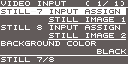


  11. And now the background colors for inputs 7 and 8 will be the background color you choose. The background color selection is shared by input 7 and 8.

  12. Press [MENU] to exit

支持

Quick Links